TikTok Shadowban Checker: How They Actually Work
Most “shadowban checkers” just guess from your username. Here’s how they actually work, what they can and can’t tell you, and how analyzing your own video data gives an honest reach estimate — not an official status TikTok never issues.
What can a checker do — and not do?
Let’s be honest up front: no tool can tell you that you’re “shadowbanned,” because “shadowban” isn’t a TikTok term and TikTok never issues that status. What actually exists is a set of rules about whether a video is eligible to be recommended in the For You feed. A video can be fully live on your profile and still be held back from that recommendation surface.
So a good TikTok shadowban checker doesn’t hand you a yes/no ruling. It does something more useful and more honest: it looks at measurable signals — how many people your recent videos reached, how that compares to your own history, and whether anything in your posting pattern lines up with known reach limits — and turns that into an estimate of visibility risk. It tells you “your reach looks normal” or “your reach looks limited, and here’s why,” never “TikTok banned you.”
That distinction matters. A checker that promises a definitive answer is overselling. A checker that gives you evidence you can act on — and admits what it can’t know — is doing the real job. For the underlying signals themselves, see how to tell if your TikTok reach is limited.
What kinds of checkers are there?
Search “am I shadowbanned checker” and you’ll get three very different kinds of tools that all use the same word. They are not equally reliable, but each has a fair use case. Here’s how they compare (for a side-by-side that also covers TikTok’s own Account status, see TikTok shadowban checkers compared).
| Type | How it works | Data it uses | Best for | Main limitation |
|---|---|---|---|---|
| Username / public-guess | You type in a handle; the tool checks whether public pages, search results or hashtag listings surface that account, then infers a status. | Only what’s publicly visible from outside the account. | A fast outside-in look at any handle, without connecting an account. | Can’t see your reach or your baseline; a normal search miss can read as a “ban.” Guesswork, not measurement. |
| Manual checklist | An article or quiz walks you through symptoms — views dropped, not appearing in search, hashtags not landing — and you self-diagnose. | Your own observations, entered by hand. | Understanding which symptoms matter and why. | Subjective and easy to misread; no numbers, no comparison to your history. |
| Real-data (official API) | You connect your own account; the tool reads your real per-video stats through TikTok’s official API and compares them to your baseline. | Your actual reach, views, engagement and posting data — read-only. | An evidence-based estimate specific to your account. | Still an estimate — it reads your outcomes, not TikTok’s internal decision. |
Username-based checkers aren’t worthless — they’re a quick outside-in look. But they can only see what a stranger sees, so a video that simply hasn’t surfaced in search can look identical to one that’s genuinely restricted. Checklists teach you the symptoms. The third type is the only one that measures your own numbers — which is where Shadowban Checker sits.
How does Shadowban Checker analyze your data?
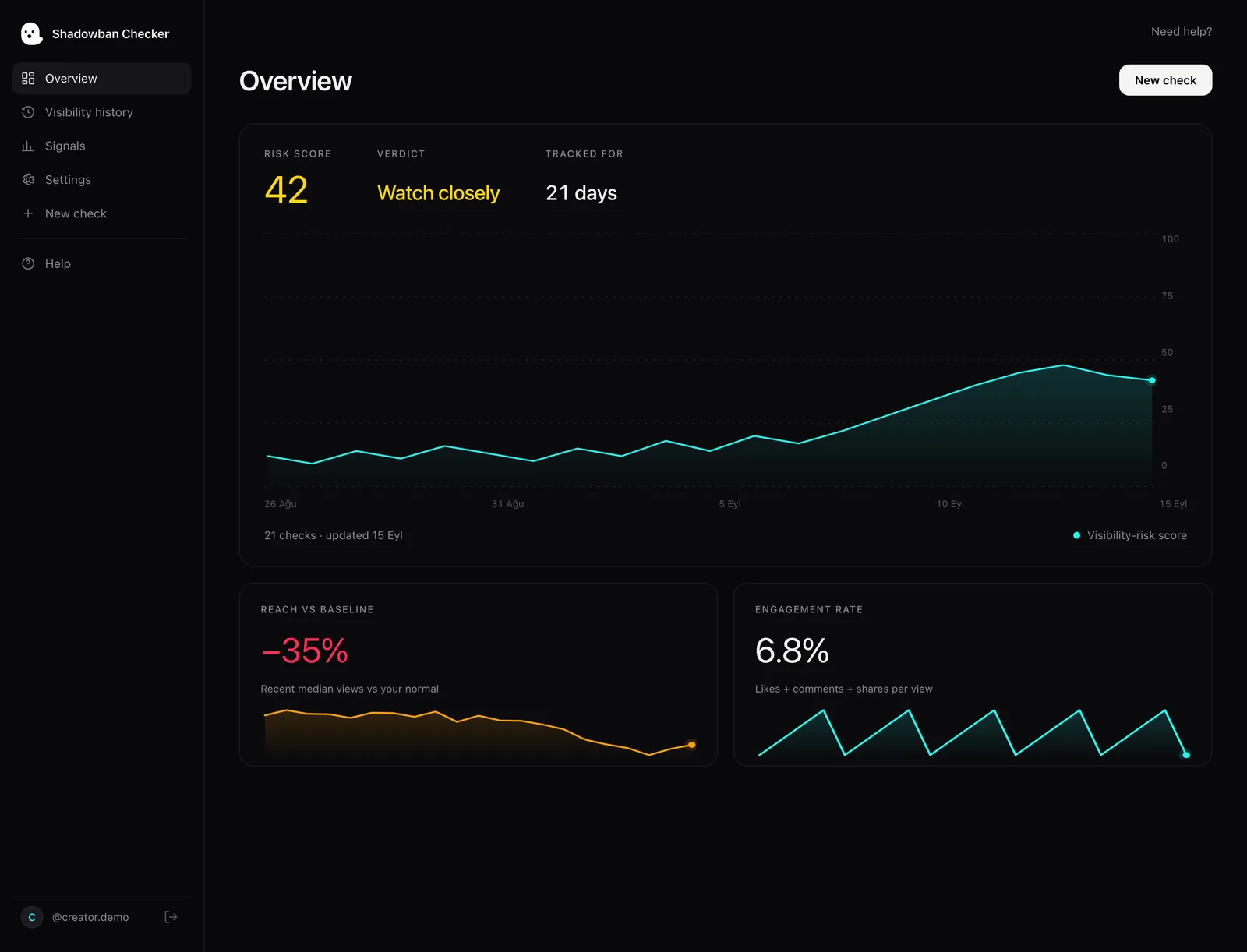
Shadowban Checker is an independent, read-only TikTok reach-analytics tool for creators. It connects to your own account through TikTok’s official login and API and estimates whether your reach is being limited — an honest estimate, not an official TikTok status. It reads your own video statistics read-only — it never posts, never messages, never changes anything, and it never needs your password. It doesn’t work from a public username alone; you connect your own account. From those stats it looks at a handful of signals that, together, describe how visible your content looks right now.
Reach vs. your baseline
Raw view counts are meaningless without context — 800 views is great for one creator and a collapse for another. So the first thing Shadowban Checker does is establish your normal range from your own recent history, then measure how your latest videos compare. A drop only counts if it’s a drop for you.
Engagement-rate inversion
This is our heuristic for separating a reach problem from a content problem. If your videos still earn strong likes, comments and shares relative to the people who saw them, but the number of people seeing them fell, that inversion — high engagement rate, low reach — points toward distribution being limited rather than the content simply not landing. If both reach and engagement rate fall together, the content is more often the issue.
Reach cliffs
A gradual slowdown is normal. A sudden cliff — where reach falls off sharply and stays down across multiple posts — is a stronger signal. Shadowban Checker looks for that step-change pattern rather than reacting to a single quiet video, because one flop is noise, not a trend. If this is your situation, why did my TikTok views drop breaks down the common causes.
Hashtags and posting patterns
Shadowban Checker flags hashtags that look spammy, overused or off-topic for the video, plus posting patterns our heuristics associate with lower reach. To be clear: this is our own heuristic. TikTok publishes no banned-hashtag list, and a flag is a prompt to review, not proof of a restriction.
A plain-language 0–100 score
Those signals combine into a single 0–100 visibility-risk score with a plain-language read — not a diagnosis. A low score means your reach looks healthy; a high score means several signals point to limited distribution and it’s worth investigating. The number is a summary of evidence, not a ruling. The free plan includes 2 checks a day; Pro is $39.99/year. Try it with a visibility check.
What can no checker do?
This is the part most tools skip. No checker — including this one — can read TikTok’s internal decisions. TikTok doesn’t expose an API that says “this account is limited.” Every tool on the market is working from outcomes (your reach, your engagement, what’s publicly visible) and inferring backward. That inference can be useful, but it’s still an inference.
What TikTok does publish is what keeps content out of the For You feed. Its Creator Academy explains, for example:
That means content that's not quite age-appropriate or discusses adult topics might not pop up in the For You feed. Additionally, content from creators under 16 will not be eligible for recommendation to people they don’t know.TikTok Creator Academy — Why is your video not getting recommended on the For You feed?
And TikTok is clear that a restriction isn’t hidden from you — it surfaces in your own analytics:
If your content is made ineligible for the FYF or otherwise restricted, this information will appear in the TikTok analytics tool.TikTok Creator Academy — Why is your video not getting recommended on the For You feed?
So the honest framing is: a checker estimates whether the effects of a reach limit are present. TikTok’s own analytics and video status are the closest thing to a source of truth. A tool that respects that boundary is more trustworthy than one that pretends to know TikTok’s mind. For the bigger question of whether the phenomenon is even real, see does the TikTok shadowban exist.
How do you combine a checker with TikTok’s own signals?
The strongest workflow uses a checker and TikTok’s built-in tools together, because they answer different questions.
- Check the video in analytics. TikTok’s Creator Academy says that if a video isn’t eligible for the For You feed, a warning bar appears at the top of its Performance tab. That’s the most authoritative per-video signal you have. For account-level issues, see how to check your TikTok account status.
- Read your traffic sources. TikTok’s analytics show where views came from. If “For You” has collapsed as a traffic source while “Following” and “Profile” hold steady, that’s a distribution pattern a checker can quantify.
- Use a data-based checker for the trend. A tool like Shadowban Checker turns those numbers into a baseline comparison and a risk score, so you’re not eyeballing a spreadsheet — an estimate of whether the dip looks like normal variance or a sustained drop.
Used this way, the checker isn’t competing with TikTok’s analytics — it’s interpreting them. The app tells you a video’s official status; the analytics show the raw numbers; the checker gives you an honest estimate of the overall pattern.
How is your data handled?
Because a real-data checker connects to your account, privacy is the whole ballgame. Here’s exactly how Shadowban Checker is scoped:
- Your own account only. You authorize your account through TikTok’s official login — no password is ever shared with us. There’s no way to “check” someone else’s account; the whole model depends on it being yours.
- Read-only. Shadowban Checker can read your video stats. It cannot post, edit, delete, follow, or send messages. There is no write access, and no access to your DMs.
- Never sold. Your stats are used to compute your visibility read and nothing else. We don’t sell your data, and you can disconnect at any time.
An independent, read-only tool that analyzes your own numbers is a safer bargain than a username field that scrapes strangers’ public pages — and it gives you a more honest answer. When you’re ready, run a visibility check on your own account.
Questions, answered.
Is there a free way to check if I’m shadowbanned on TikTok?
Yes — the most reliable free method is to read your own data. Open TikTok’s analytics, look for the For You eligibility warning on individual videos, and check whether “For You” has fallen as a traffic source. A read-only visibility check (2 free checks a day) automates the baseline comparison, but any result is an estimate, because TikTok never confirms a “shadowban.”
Are username-based shadowban checkers accurate?
They’re a rough outside-in look, not a measurement. A username checker can only see what a stranger sees, so a video that simply hasn’t surfaced in search can look the same as one that’s genuinely restricted. For a useful read you need your own reach and engagement data compared to your baseline, which requires connecting your account.
Can any tool give me an official shadowban status?
No. “Shadowban” isn’t a TikTok term, and TikTok doesn’t expose an API that reports account-level limits. Every checker infers from outcomes. The closest thing to an official answer is TikTok’s own analytics, which TikTok says show when content is made ineligible for the For You feed or otherwise restricted.
Does connecting a shadowban checker to my account put it at risk?
Not with a read-only tool that uses TikTok’s official login. Shadowban Checker connects through TikTok’s official API with read-only access: it can view your video stats but cannot post, delete, follow, or message, and it never asks for your password. Avoid any tool that asks for your password directly.
How do I know if it’s a reach limit or just bad content?
Our heuristic: look at the relationship between reach and engagement rate. If your videos still earn strong likes, comments and shares relative to how many people saw them but overall reach dropped, that points toward limited distribution. If both fall together, the content is more often the issue. See how to tell if your reach is limited.
Sources
- TikTok Community Guidelines — For You feed Eligibility Standards
- TikTok Creator Academy — Why is your video not getting recommended on the For You feed?
- TikTok Creator Academy — Moderation and Appeals
Statements about TikTok’s policies are drawn from these primary sources and quotes are verbatim. Where TikTok has no official statement, or where we describe our own heuristics, the text says so.
More on your reach.

How to Tell If Your TikTok Reach Is Limited: The Real Signals
There’s one signal TikTok actually gives you, and a handful of patterns worth watching. Here’s how to separate a real reach limit from normal ups and downs — without the myths.
TikTok Comment Shadowban: Are Your Comments Being Hidden?
TikTok has no documented “comment shadowban,” but it does give creators real tools to filter comments on their own videos, and it sorts some comments lower. Here’s how to tell the difference — and how to check if your comments actually show to other people.

TikTok LIVE Shadowban: Why Your Lives Get No Viewers
There is no documented “LIVE shadowban.” Empty LIVEs usually trace to eligibility, timing, audience size, or a documented LIVE restriction. Here is what TikTok’s guidelines actually say, and how to tell which one you are hitting.